 Ticket Actions
Screen Navigation: AIOps > Project > Tickets

AIOps enables the Admin/Engineer users to review and perform different actions on a ticket.
Following table explains the different actions that can be performed on tickets with different statuses.
|
Ticket Status |
Actions |
|
Open |
Assign, Hold, Do Not Auto Close |
|
Active |
Assign, Hold, Resolve, Recommended Resolution, Do Not Auto Close |
|
On Hold |
Remove, Hold, Do Not Auto Close |
|
Resolved |
Reopen |
Expand the drop down arrow corresponding to actions field for a ticket.
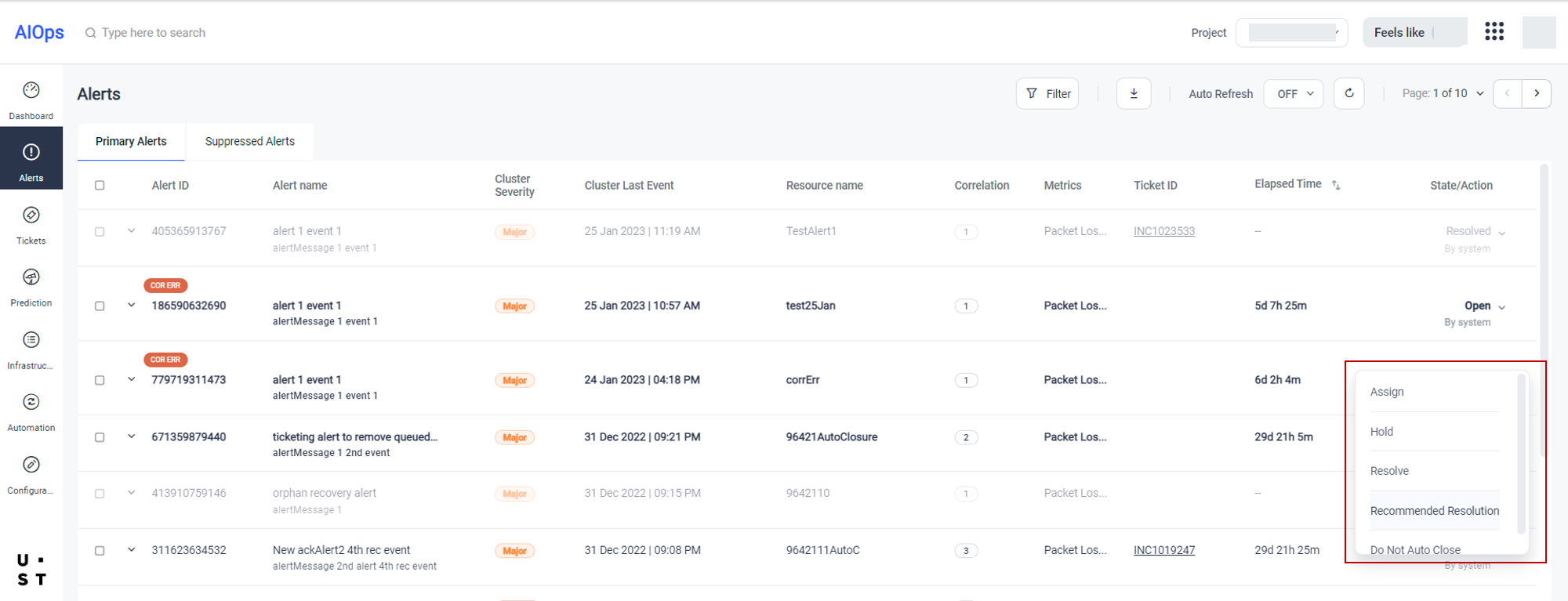
Assign
To Assign a Ticket, select Assign option from the drop down.
A ticket can be assigned to self, to group, or individual.
You can select the appropriate option and assign the ticket.
Hold
To Hold a Ticket, select Hold option from the drop down.
You can move the ticket to "On Hold" status temporarily and assign later on.
Remove Hold
Select Remove Hold to remove the On Hold status
Resolve
To Resolve a Ticket, select Resolve option from the drop down.
Recommended Resolution
To get Recommended Resolution, select Recommended Resolution option from the drop down.
Reopen
AIOps provides the option to re-open a resolved ACK/ticketed cluster. To reopen a ticket, select the Reopen option from the drop down corresponding to a resolved ticket.
Copyright © 2025 UST . All Rights Reserved.