 Introduction to UST SmartOps™
In today's fast-paced business world, organizations are constantly searching for ways to improve their operations and gain a competitive edge. One approach that is rapidly gaining popularity is Intelligent Process Automation or IPA. IPA is a sophisticated approach to automation that involves a series of interconnected steps, including discovering, analyzing, designing, automating, measuring, monitoring, and reassessing business flows. Unlike simple automation, which involves the transfer of a single process from manual to bot-driven work, IPA identifies, designs, and analyzes automated workflows. It represents the maturation of the contribution that automation can make to your business by increasing the scope and the business impact of automation. IPA can streamline repetitive tasks, simplify complex processes, and create a highly efficient and adaptable automated system. As a result, businesses can stay ahead of changing demands, enhance productivity, and gain ongoing value from their automated workflows.
IPA is a powerful automation approach that incorporates innovative technologies like artificial intelligence (AI), machine learning (ML), robotic process automation (RPA), and natural language processing (NLP). This advanced automation methodology has the potential to increase business value and gain a competitive edge for clients. UST SmartOps™ (also known as UST SmartOps™ Platform) is an IPA enabling platform that uses automation-enabled workflows as its primary component to deliver end-to-end automation solutions for various business scenarios. UST SmartOps™ uses cognitive automation to accelerate business opportunities intelligently and continuously by reducing costs, streamlining efficient operations, and uncovering unrealized growth revenues for enterprises. With its pre-built models, AI solution templates, multiple deployment options, and user-friendly interface, UST SmartOps™ can be easily integrated into enterprise setups, enabling organizations to create new business value. The intelligent automation capabilities of UST SmartOps™ are provided through a Platform-as-a-Service (PaaS) model, which includes a state-of-the-art, low-code/no-code platform, allowing users to easily create and manage automation workflows. The Automation Library, which contains reusable building components such as Microactions, Microflows, Automation Stories, and Integration connectors, further enhances the capabilities of the platform.
Capabilities of UST SmartOps™
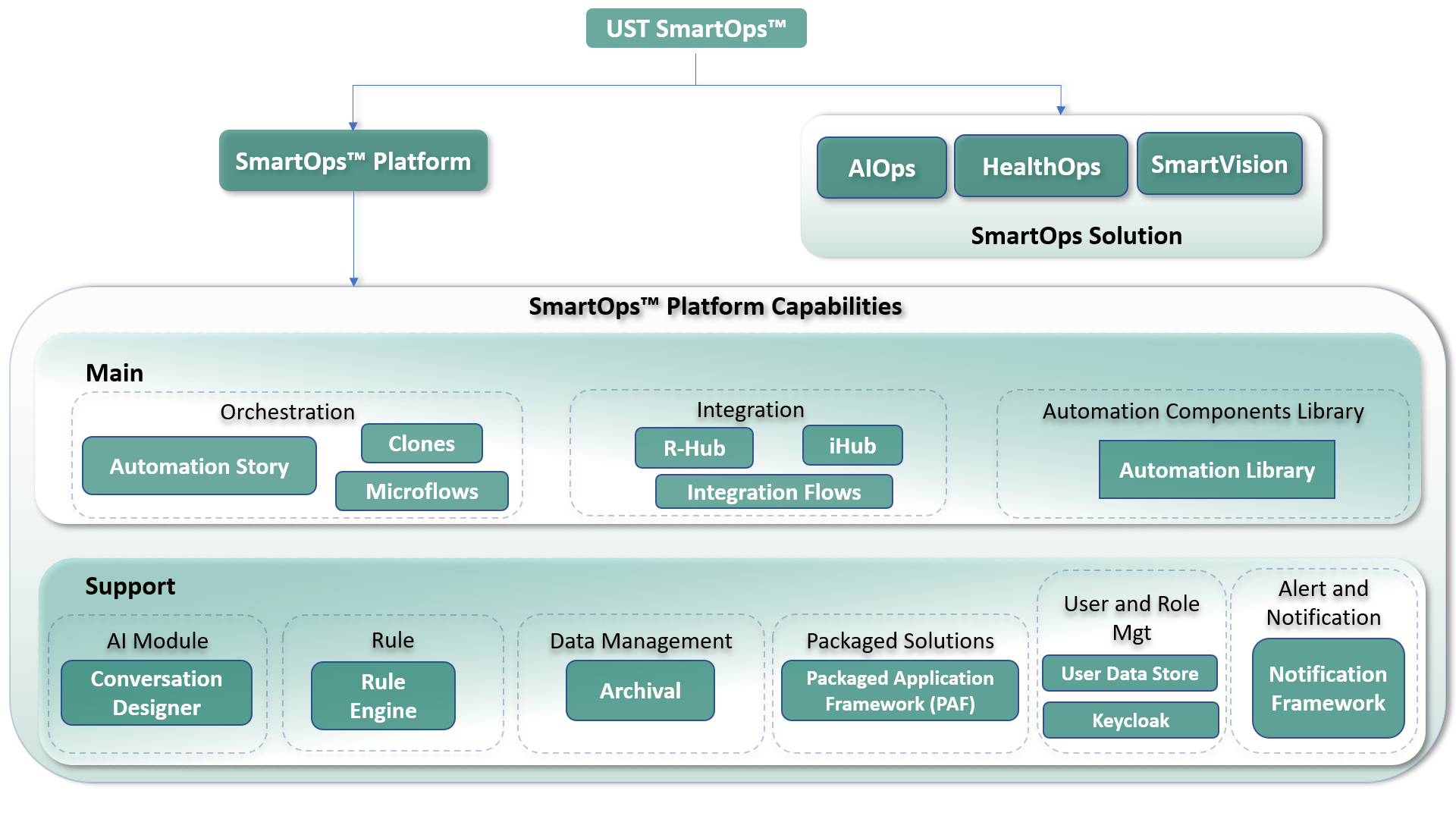
The features in UST SmartOps™ allow users to automate their tasks, connect different systems, and reuse components for faster automation implementation. The following image displays the capabilities and solutions of UST SmartOps™:
UST SmartOps™ has the following capabilities:
Orchestration
UST SmartOps™ provides comprehensive end-to-end automation solutions for various business use-cases through the integration of other applications. The orchestration capabilities of UST SmartOps™ comprise the Automation Story Orchestrator and Clones Microflow.
The Automation Story Orchestrator is used for enterprise-level automation and utilizes the Automation Story framework to achieve business process automation. This framework employs native components, such as Microflows/Workflows, Integration Connectors Flows, and Rules, along with pre-built building blocks from the Automation Library, enabling domain experts to build automations themselves without the need for a dedicated automation development team. The Automation Story framework is scalable, resilient, supports role-based access, and offers integration with the single global Automation Library.
Clones Orchestrator is a user interface that provides access to all the reusable Microactions required for building Microflows. It includes a Dashboard for monitoring Microflow execution and an Administration module for managing user and role mapping. The Studio, a low-code/no-code platform, provides an editor window for design users to build workflows and visualize Microactions and Microflows using a state-of-the-art design board.
Microactions are the smallest automation units used to build workflows and can be imported and exported by users. Microflows, also known as Workflows, are micro-level flows built using Microactions to achieve part of the automation use case. Multiple Microflows can be combined to create an Automation Story, which is held in the Workspace Interface. The interface organizes workflows created by the user and other users under a tree folder structure, allowing for the import and export of workflows based on project needs. The Workspace Interface holds all workflows created by the user and other users categorized under a tree folder structure. Users can import and export workflows based on the needs of the project.
Integration
The Integration module of UST SmartOps™ comprises the C-Hub, which includes RHub instances, SmartOps™ PaaS, and Cloud services, as well as the Integration Hub (iHub).
The C-Hub (Integration Flows) acts as the central hub for RHub, managing the configuration of each registered RHub instance and providing users with the ability to update this configuration. Users can define integration flows within the C-Hub using available adapters. Once an integration flow is created, it can be published to any RHub instance within the organization, including the default instance in SmartOps™ PaaS.
The Integration Hub, or iHub, facilitates communication between UST SmartOps™ applications and external third-party systems. It enables integration between SmartOps PaaS, cloud services, and other internet-accessible applications. Additionally, it allows for remote integration with systems that are only accessible within the customer's network, using the Remote Hub (RHub).
Remote Hub or RHub is a module integrated into UST SmartOps™ that enables remote integration. It establishes connectivity between UST SmartOps deployed on PaaS and customer systems that are not externally accessible. RHub includes an orchestrator that sequentially executes predefined integration steps, such as invoking APIs or retrieving files from FTP servers. It offers pre-built adapters, such as the API Agent and FTP adapter, for executing these integration steps. Users also have the flexibility to develop custom adapters to address specific integration requirements.
Automation Library
UST SmartOps™refers to its collection of reusable automation components as the Automation Library. The Automation Library is a pre-built global library that includes a variety of reusable building components, like Microflows and Integration flows, which can be leveraged across multiple environments, products, and regions. When a user adds a new component to the Automation Library, it becomes available to other users across different regions and environments. To illustrate, an AIOps automation engineer could share a ServiceNow Action Microflow in the Automation Library. Additionally, the Automation Library also comprises of micro actions and integration flows that designers can reuse to develop automation flows.
AI Module
SmartOps™ platform offers AI capabilities through the Conversational Designer, allowing users to set up projects and train models to identify intents and entities based on utterances. The platform also provides AI-based input and step recommendations to assist users in setting up Automation Story components.
The Conversation Designer component of SmartOps™ is designed to provide NER (Named Entity Recognition) capabilities to users, allowing them to set up NER projects and train them to recognize intents and entities based on user utterances. Each project can be trained to identify specific intents and entities using natural language inputs. Once a project is set up and trained, the resulting model can be accessed as a REST endpoint from Automation Stories or packaged applications. This feature is especially useful in applications like AIOps, where it can help to understand the intent behind incoming service desk tickets and select the appropriate Automation Story to resolve them. With NER capabilities, the system can recognize the intent of the user's request and take the necessary actions accordingly.
The AI module in Automation Story definition helps users by providing suggestions for suitable inputs for component fields. Also, the module helps platform to recommend the next steps during construction of the automation flow. This includes a list of components that can be added to the Automation Story, streamlining the process of creating the automation story.
Rule
The Rule capability of UST SmartOps™ applies business rules and actions as defined by end users without affecting how the application runs. It comprises of the Rule Engine.
The Rule Engine enables applications to establish and execute rules for various purposes such as validation and classification. Access to the rule engine is available through a ‘Nine Dots’ menu with restricted permissions, and users can view the execution history of the defined rules. Rules are designed separately from the application and are defined in a Drl file or an xl-based rule definition. Business rules can be easily modified without altering the source code. The rule engine can be used to set up and manage these rules independently from the application code. Each rule has a unique ID that can be used in automation flows or in packaged products built on the platform. This helps keep the business rules separate and configurable.
User Data Management
The administrative capability of UST SmartOps™ is comprised of User Data Management, which consists of the User Data Store/ Keycloak. The User Data Store (UDS) and Keycloak handle Identity and Access Management across all applications and products. By utilizing the User Data Store and the features offered by Keycloak, it becomes possible to develop customized solutions with control on user data management. These solutions can also incorporate Package Workflow, Notification Framework, and Metering, allowing for efficient management of identity and access across all applications. Using keycloak, real-time access tokens can be generated for application-specific users based on their credentials, enabling application-to-application authentication.
Data Archival
The Data Archival capability of UST SmartOps™ makes provision to archive records older than a specified date (driven by business needs) and remove them from the platform, for any transactional data stored in the platform. Using this capability helps by improving the performance of the platform by limiting active data, enhancing security by limiting the range of data that is accessible via the platform, and saving cost by moving older, unused data to cheaper storage.
A two-stage archival process is defined and implemented across the platform:
Stage 1 - Hot Archival Data older than a specified threshold is moved to another table (or collection or index in the same database - referred to as table here for brevity). This new table will be versioned based on the structure changes happening in the parent table.
Stage 2 - Cold Archival Data from hot archival tables, that is older than a specified threshold, will be removed from the database used by the application and stored in a cheaper storage (such as Azure Blobs). This data will no longer be available to the application for query/reporting, and its restoration will also be more involved and time-consuming. However, this data will be retained for a further period to meet any regulatory obligations, audits, or restoration in a rare scenario.
Packaged Solutions
UST SmartOps™ provides a Packaged Workflow Framework (PWF) that allows for the creation of custom applications and workflows tailored to meet the needs of businesses or customers. This framework enables the development of packaged products, such as AIOps and Invoice Extraction, on top of the platform. Each PWF includes a list of projects that can be organized according to the specific requirements of the business or customer.
Alert / Notification
The Notification feature alerts users of important or relevant information or events within a system, typically as in-app notifications and emails.
The Notification framework is a platform component that enables applications to send and receive notifications. It supports In-App Notifications and email notifications.
In-App Notifications are received within the application and are the default notification for app events. Email notifications can be configured for specific events, such as when a document extraction is completed. Templates are available for each event, and the email contents can be personalized using mail merge. SMS notifications can also be configured for specific events, using templates and mail merge for personalization. For example, the user can receive an SMS notification when document extraction is completed. Additionally, the platform supports scalability, availability, performance, and security for applications deployed on it.
PaaS (Platform as a Service) Administration
The PaaS Administration portal of UST SmartOps™ provides functionalities for both PaaS administrators and individual organization (tenant) administrators to manage their respective entities.
PaaS administrators have the following capabilities:
-
Create new organizations (tenants): PaaS administrators can create new organizations within the PaaS instance, allowing them to onboard new tenants and allocate resources accordingly.
-
Associate/dissociate products and solutions: PaaS administrators can associate or dissociate specific products and solutions with an organization, granting or revoking access to certain features or functionalities based on the organization's needs.
Organization administrators, on the other hand, have the following privileges within their respective organizations:
-
Specify encryption key for sensitive information: Organization administrators can specify the encryption key to be used for encrypting sensitive information within their organization. This approach is often referred to as Bring Your Own Key (BYOK) encryption.
-
Add and manage users and roles: Organization administrators have the authority to add and manage users within their organization. They can assign specific roles to users, granting them appropriate permissions and access levels based on their responsibilities and requirements.
By providing these administrative capabilities, the PaaS Administration portal ensures efficient management and control over the PaaS instance as well as individual organizations within it.
SmartOps™ Solutions for Enterprises
The UST SmartOps™ offers a pre-built workflow framework, allowing users to develop packaged products that utilize the capabilities of the platform. Two examples of such applications are AIOps, SmartVision, and HealthOps. Users can create projects within each packaged product, organized based on specific business or customer needs. In addition to this, UST SmartOps™ consists of the following solutions for enterprises:
AIOps
Artificial Intelligence for IT (Information Technology) Operations or AIOps is a solution that applies analytics and machine learning to automate and improve IT operations, bringing the speed and accuracy of AI to the management of complex IT systems. AIOps can help teams respond more swiftly to issues and deliver significant automation.
SmartVision
Smart Vision leverages the potential of Cognitive AI to accelerate the digitization of businesses that rely heavily on documents. By integrating various data devices and data points, Smart Vision enables the implementation of data-driven solutions that can enhance business operations.
HealthOps
HealthOps, developed by UST, is a patient-focused system that has the potential to minimize data discrepancies, expedite the process of accessing medical treatment, and notably enhance the standard of care. By utilizing cognitive artificial intelligence and smart automation, HealthOps can revolutionize patient involvement at every step of the healthcare journey, from registration to admission, agreement, correspondence, and billing, resulting in smooth and seamless healthcare experiences.
Copyright © 2025 UST. All Rights Reserved.