
Correlation Setting

The Correlation Setting allows you to use recently resolved alert clusters for correlation.
To set the time limit for this,
-
Select Configuration tab in AIOps.
-
Select Correlation Setting on the left pane by expanding Alert Correlation.
The Correlation Setting screen appears. Here, you can specify the time limit in Days/ Hours/ Minutes for the recently resolved alert clusters to use them for correlation.
If a non-recovery alert is added, the alert cluster and associated ticket will be re-opened.
You can also specify the time limit in Hours/ Minutes (maximum 24 hours) for the recently closed alerts for merging alert events.
If a non-recovery alert event is merged, the alert cluster and associated ticket will be re-opened.
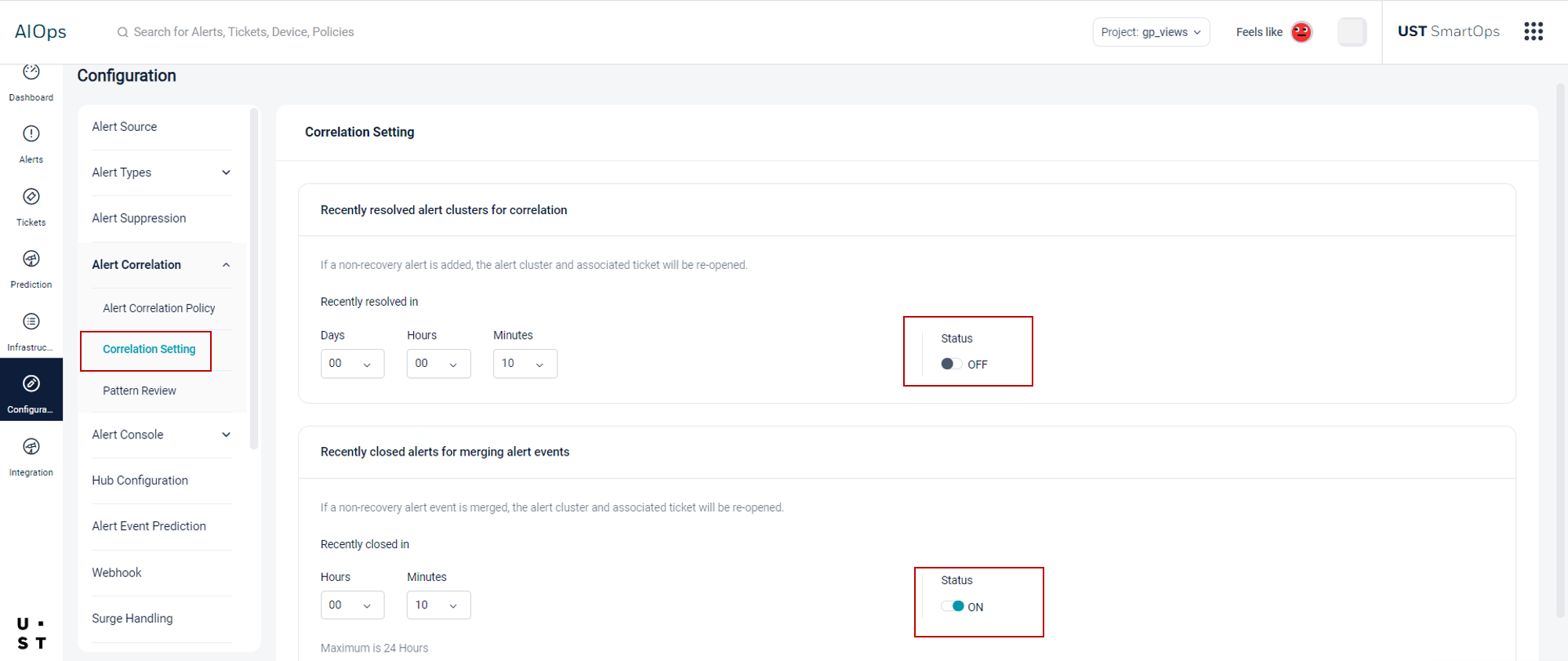
The Status button corresponding to Recently resolved alert clusters for correlation and Recently closed alerts for merging alert events makes it clear that these are two separate options and can be set individually.
Copyright © 2025 UST . All Rights Reserved.